How Can I Find Out My Wifi Password
3WiFi: open up database of Wi-Fi Access Points passwords
Router Browse program scans the networks and collects information almost the routers, including the passwords for Wi-Fi networks.
To detect out the countersign from the neighboring Wi-Fi, you lot demand to scan the entire IP range of your neighbor's Cyberspace provider. If yous do not know what is neighbor's Internet access provider, yous need to scan the IP range of your region (land). This needs much time, but the issue is not guaranteed, considering the neighbour router can be protected well and even if y'all scan it, you will non be able to find out the password; It can likewise exist behind NAT (a technology that allows one IP to be used by several users at one time) in this case nosotros can not even scan its router.
Members of the Router Scan community share the results of scanning with the 3WiFi service, which places them on a user-friendly map. Therefore, online yous tin can find information about:
- wireless access points (Wi-Fi) in your expanse
- network names (ESSID)
- MAC address of the networks (BSSID)
- Wi-Fi network password
Usage of 3WiFi is free of whatsoever charge. In lodge to see passwords of Admission Points you must log on to the site. For this, you exercise not demand to register.
Limited guest account (but for members of the Router Scan community):
- Login: antichat
- Password: antichat
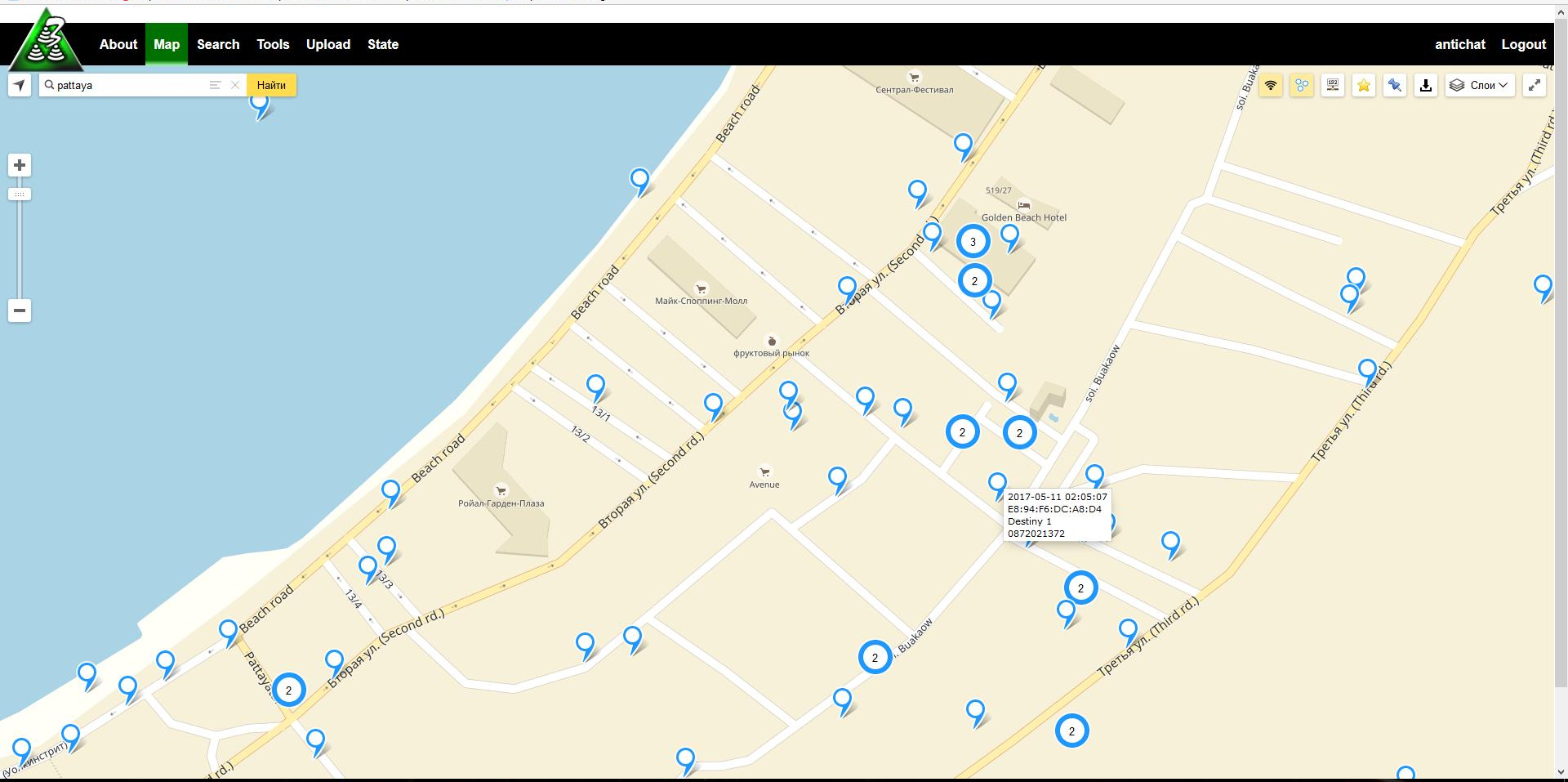
Map of Wi-Fi networks
http://3wifi.stascorp.com/map
On the map, you tin discover passwords of Wi-Fi networks about you or anywhere in the world. You need to enter the address, alternatively, the name of the object. You will see available data almost wireless access points. The data goes in the following order:
- date of adding to the database
- MAC Address
- network name
- network password
Search the Wi-Fi password database
http://3wifi.stascorp.com/find
This page is interface for Free Wireless Database, yous can search for access points by:
- BSSID / MAC
- ESSID / Name
- Wi-Fi Key
- WPS PIN
In addition, you lot can utilise wildcard characters.
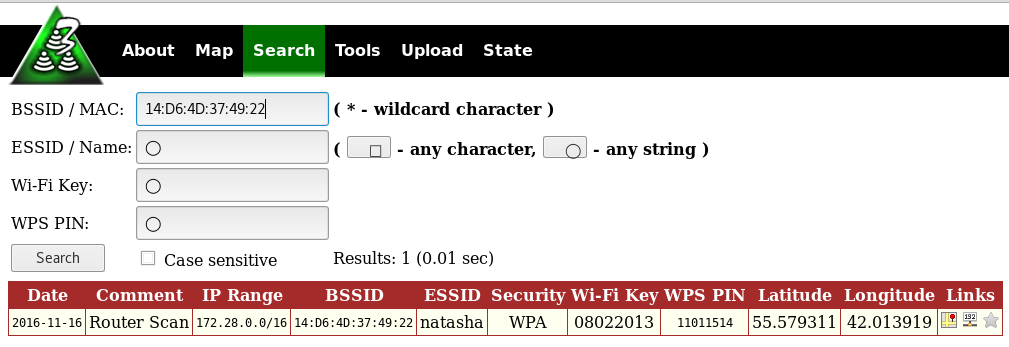
For example, searching by BSSID 14:D6:4D:37:49:22
Search by BSSID using wildcard character 14:D6:4D:37:49:*
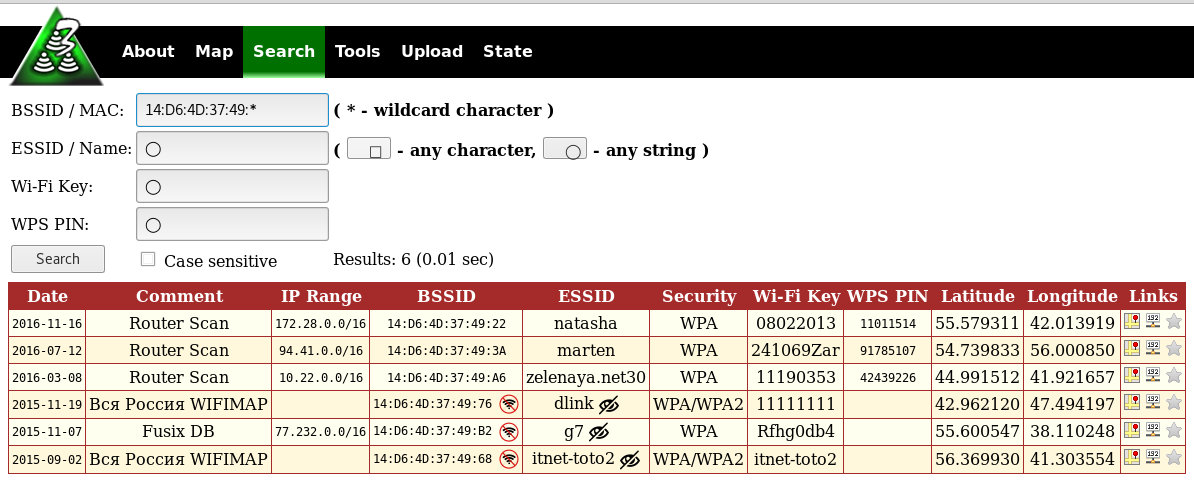
The asterisk (*) replaces any character and tin can stand anywhere in the search string.
Advantages of searching past BSSID (MAC address) is that usually devices have a unique BSSID, therefore and you lot volition find exactly the access bespeak that you lot are interested in.
Not anybody knows how to recognize BSSID from neighboring Wi-Fi (although it can be done directly in Windows with WirelessNetView and in Linux with numerous programs, for example, Airodump-ng), and so you lot tin can search for it past the network proper noun (ESSID).
An example of searching for networks named 'pattaya':
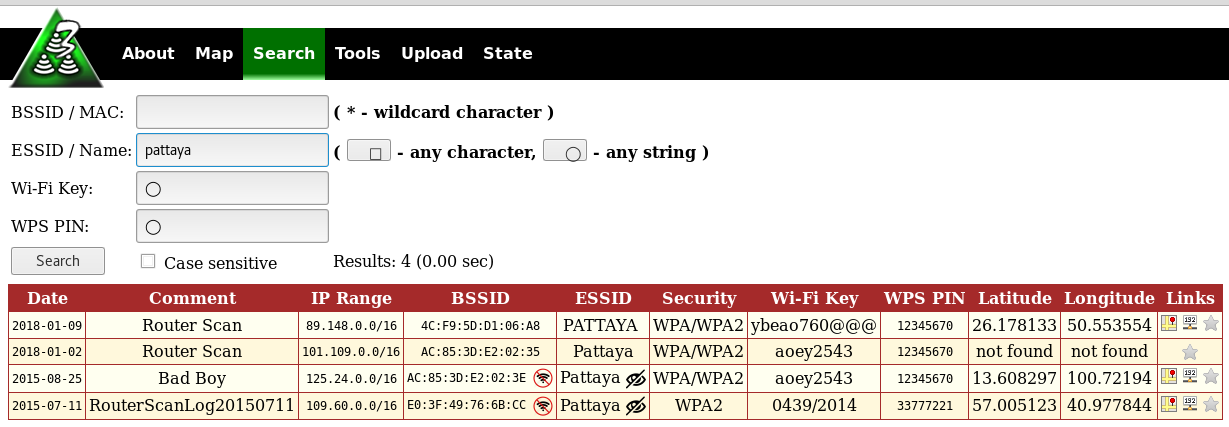
As you can run into, the instance of letters is not important.
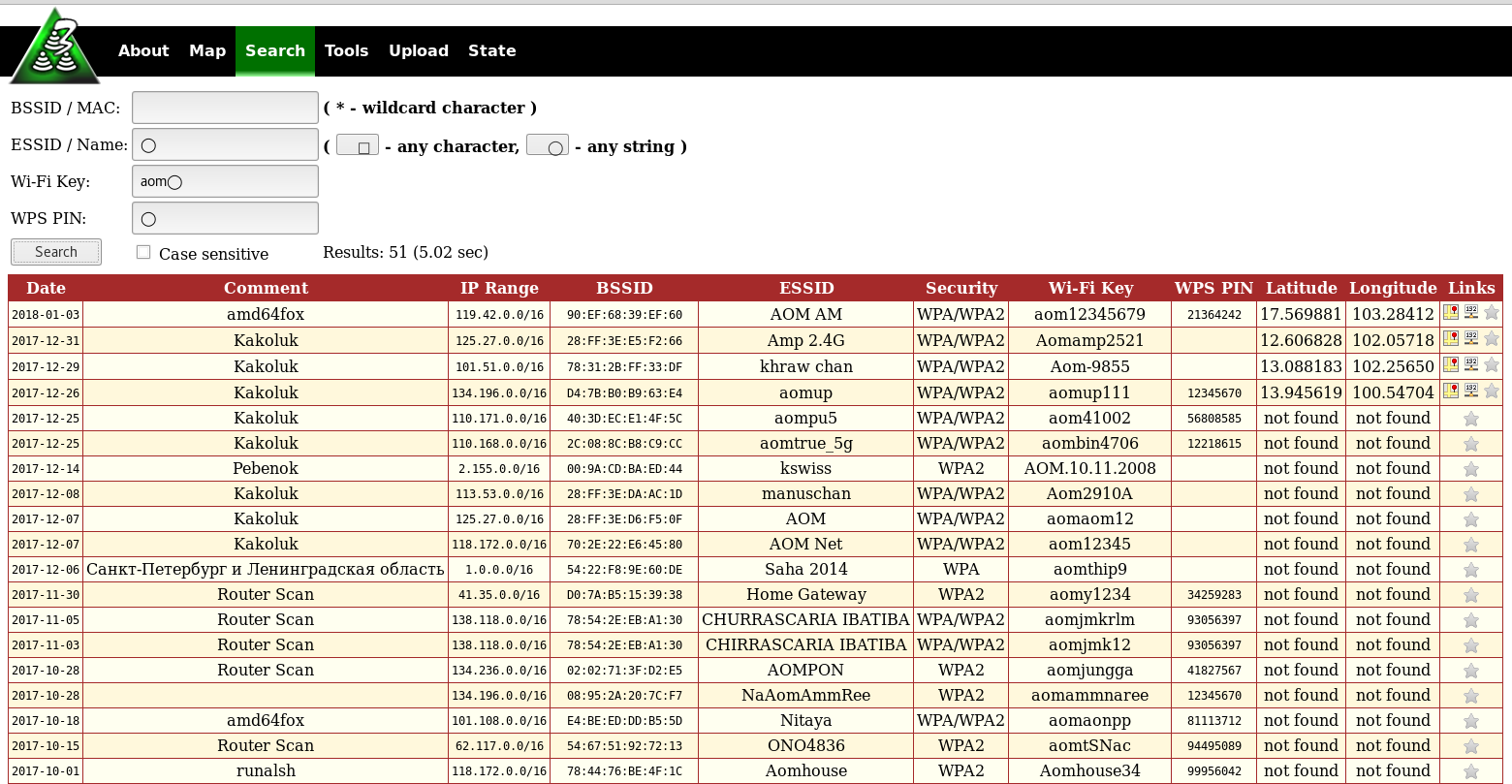
Wildcard characters are supported: □ is whatever graphic symbol, ◯ is any grapheme set (any cord). Example:

Yous tin also search for access points using the Wi-Fi password (the network key) and the WPS Pivot code; this tin exist useful for research purposes.
Additional 3WiFi tools
Search IP Ranges by geographical location
http://3wifi.stascorp.com/ranges
This tool allows yous to search IP ranges past the physical (geographical) location. The comparison is based on the collected data from the geolocation providers.
Therefore, you enter the geographical coordinates, the radius of the search, and become:
- IP Ranges
- Network proper noun
- Description
- Land
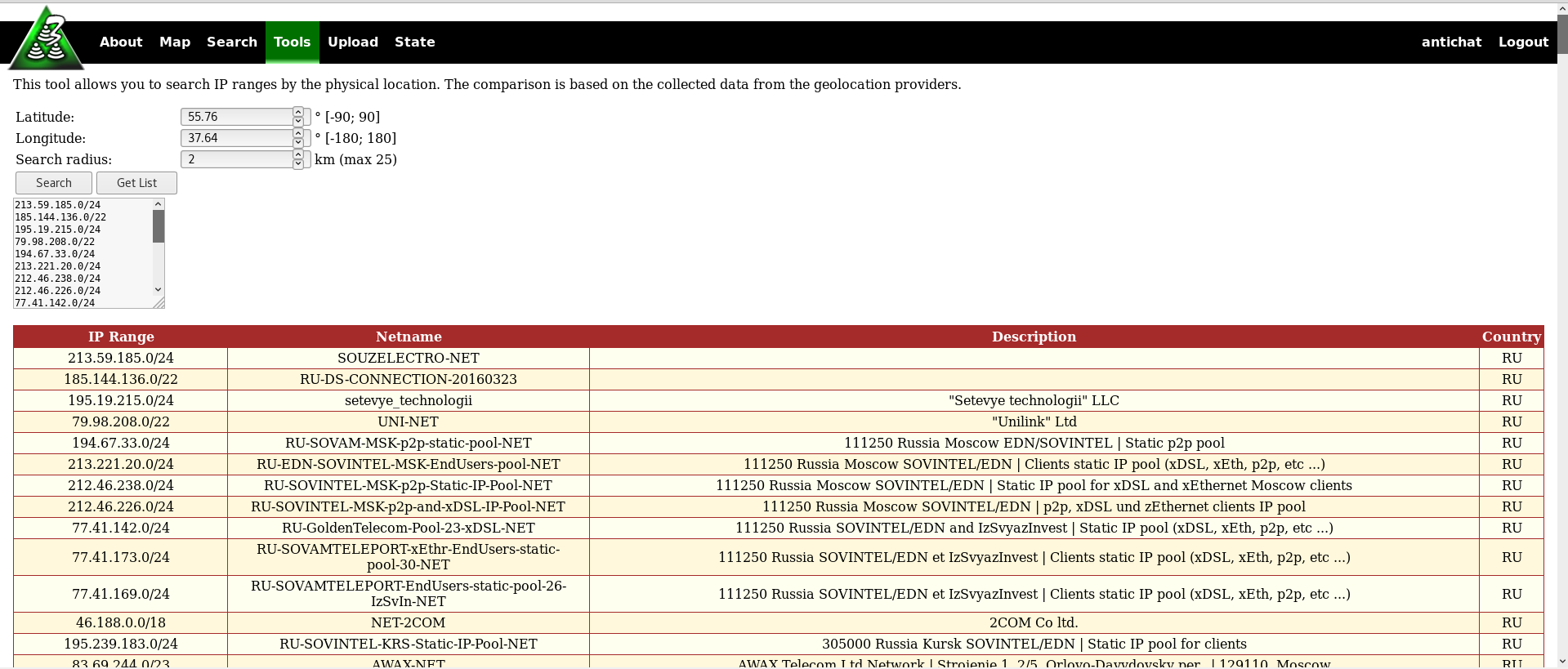
This is a very useful tool for network researchers who want to scan IP over sure geographical coordinates.
The verbal model of the device by MAC address
http://3wifi.stascorp.com/devmac
This tool allows yous to determine router manufacturer and model by its BSSID / MAC address. The comparison is based on the data collected by Router Browse.
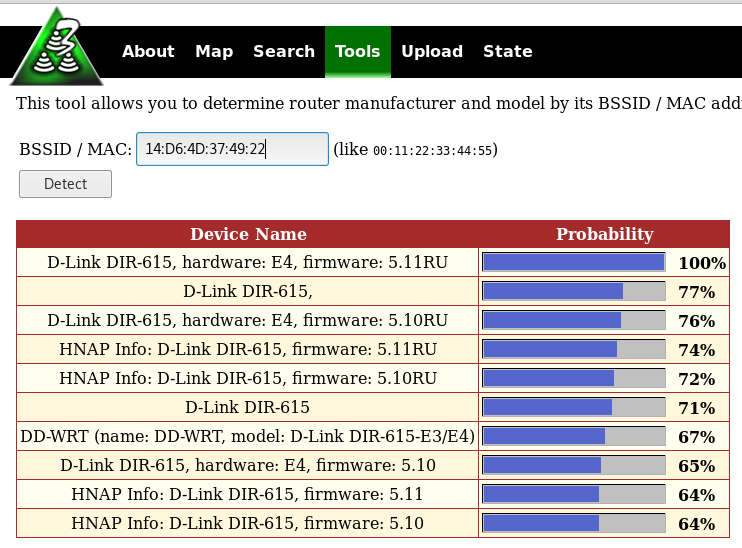
Notation that unlike many similar services (like this), not just information nearly the manufacturer is displayed, detailed data about the model is displayed, and there is probabilistic data virtually the firmware of devices.
WPS Pivot Generator
http://3wifi.stascorp.com/wpspin
A very useful tool if you want to connect to Wi-Fi when you practise not know the password from this network, but the access bespeak supports WPS. This service will help you guess the WPS pin based on the MAC address of the AP.
There are two varieties of the WPS Pivot generator:
- Offline WPS Pin Companion from Router Browse (Uses known algorithms, does not use database).
- Online 3WiFi WPS PIN generator (Takes advantage of collected data in the database, detects linear sequences, static PIN codes, and other algorithms).

How to get 3WiFi to your computer
You cannot download the 3WiFi database. Attempts to pump out the database will pb to the ban of your account and the ban of all invited by you and further forth the chain. No merit volition not remove the ban.
Nonetheless, you tin can organize your own 3WiFi on your computer or on your server, since the Source code for 3WiFi is hosted on GitHub: https://github.com/binarymaster/3WiFi
Therefore, you need a web server, and you also take to scan the ranges you lot need to have your search information in your 3WiFi database.

Steps for installing 3WiFi:
- Copy all required files to your /world wide web directory
- Create database (execute 3wifi.sql to create tables)
- Copy config.php-distr to config.php
- Edit config.php (DB_SERV, DB_NAME, DB_USER, DB_PASS etc)
- (optional) Turn on memory tables (in the config.php define TRY_USE_MEMORY_TABLES every bit true)
- (optional) Use import.free.php once to import old format database
- Start all background daemons:
# Upload routine loads information into database
php -f 3wifid.php uploads
# Finalize routine prepares tasks for finalization
php -f 3wifid.php finalize
# Geolocate routine locates new added BSSIDs on map
php -f 3wifid.php geolocate
# Stats routine caches statistics (use merely when stats caching enabled)
php -f 3wifid.php stats
# Memory tabular array manager (utilise only with retentiveness tables enabled)
php -f 3wifid.php memory
Database maintenance:
# Recheck not constitute BSSIDs in the database
php -f 3wifid.php recheck
Before running the daemons, make sure that php-cli interpreter is accessible from your directory.
Decision
3WiFi is a gratis database of access points (open source under the Apache 2.0 license) developed past the Router Scan community with the participation of Stas'M Corp.
It stores the admission point data that was received equally a result scans performed by Router Browse. All data is downloaded to the database voluntarily - either through the website, or directly from Router Scan.
The 3WiFi database is used past the Router Scan customs to search for access points, to investigate new vulnerabilities in wireless routers, to observe previously unknown WPS pin-code generation algorithms, to notice routers' mass destruction hotspots (such every bit substituting SSID name, DNS servers, etc.) , and for many other purposes.
Besides 3WiFi base is used by Stas'Thousand Corp. for monitoring, detecting and correcting errors and inaccuracies in real-time scanning results.
The 3WiFi website provides unique services that can be useful to customs members:
- View access points on the map
- Search for access points past BSSID or name
- Search for IP ranges by location
- Determine the device model by MAC address
- Statistics on various parameters of wireless networks
The accost of the official 3WiFi database: http://3wifi.stascorp.com/
Source: https://miloserdov.org/?p=746
0 Response to "How Can I Find Out My Wifi Password"
Post a Comment